News
Display Parallel Interfaces Explained: RGB vs. MCU vs. TTL Parallel for TFT LCD Modules
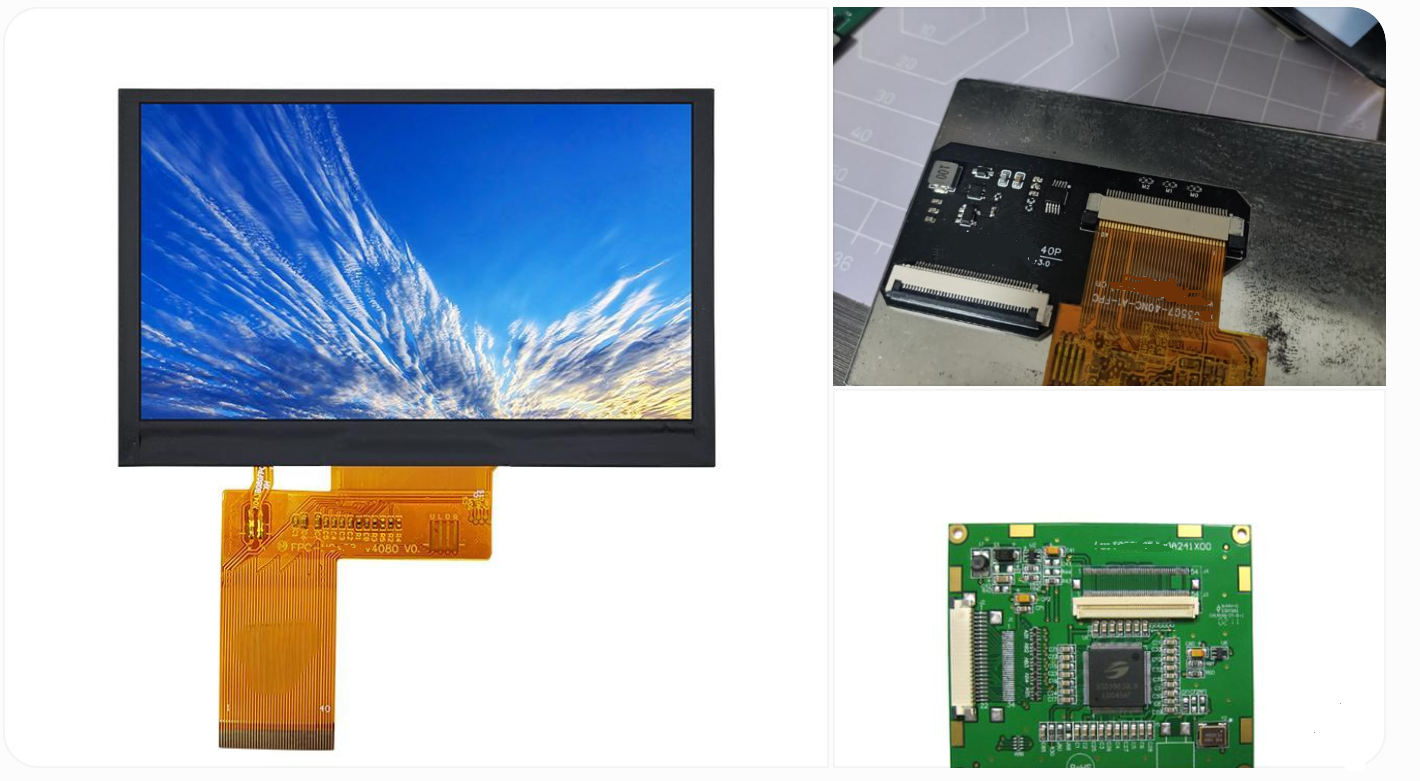
Display Parallel Interfaces Explained: RGB vs. MCU vs. TTL Parallel for TFT LCD Modules
Choosing the Right Parallel Interface for Your Display Project
Selecting the right display interface is an important step in designing an industrial display system. The interface determines how a processor communicates with a TFT LCD module, how image data is transferred, how many hardware resources are required, and how easily the display can be integrated into the final product.
Although serial interfaces such as MIPI DSI, LVDS, and eDP are widely used in modern display systems, parallel interfaces remain practical choices for many embedded devices, industrial human-machine interfaces (HMIs), and cost-sensitive applications.
Three terms frequently appear in TFT LCD datasheets and hardware designs:
-
RGB parallel interface: Transfers pixel data continuously using a pixel clock and synchronization signals.
-
MCU parallel interface: Uses a command-and-data bus to communicate with a display controller, commonly through an 8080 or 6800 interface.
-
TTL parallel interface: Describes a parallel signal implementation using single-ended logic-level signals. In many display datasheets, this term refers to TTL RGB rather than a separate communication protocol.
These terms are related, but they do not describe exactly the same thing. Understanding their differences helps engineers select compatible display modules, simplify PCB design, and avoid unnecessary development costs.
This guide explains how RGB, MCU, and TTL parallel interfaces work, compares their practical characteristics, and outlines the key considerations when integrating a TFT LCD into an industrial product.
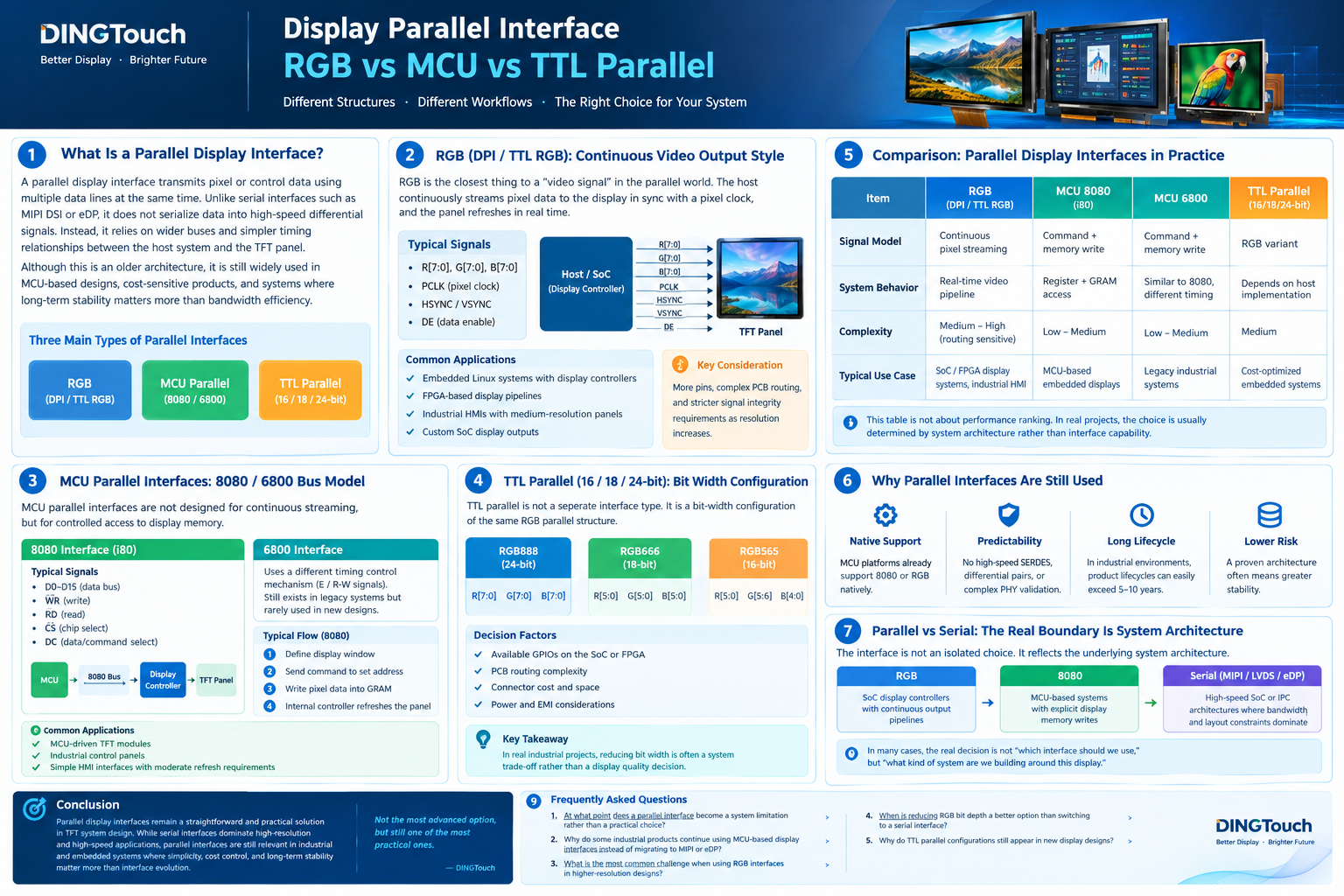 1. What Is a Parallel Display Interface?
A parallel display interface transmits multiple bits of data simultaneously over separate signal lines. Instead of sending all the data sequentially over a small number of high-speed serial lanes, the interface uses a wider bus to transfer information.
In TFT LCD systems, parallel interfaces generally fall into two major architectural categories:
-
Video-oriented interfaces, such as RGB or DPI, which continuously transfer pixel data to the display.
-
Command-oriented interfaces, such as MCU 8080 and 6800, which send commands and pixel data to a display controller.
TTL, meanwhile, describes the electrical signaling convention commonly associated with these parallel connections.
How Does a Parallel Display Interface Work?
The host processor or display controller generates the signals required by the LCD module. Depending on the interface architecture, these signals may include:
-
Pixel data lines or a command/data bus
-
Pixel clock or bus-control signals
-
Horizontal and vertical synchronization signals
-
Data enable signals
-
Chip-select, read, write, or data/command control signals
The display module receives these signals and processes the information according to its interface architecture.
For an RGB interface, pixel data is transferred in coordination with display timing signals. For an MCU interface, the host sends commands and pixel data through a controlled bus transaction.
The exact signal names, voltage levels, timing requirements, and supported data widths depend on the specific display controller and module.
Why Is Interface Compatibility Important?
Two displays with the same size and resolution may require completely different host-side hardware.
For example, a 480 × 272 TFT LCD with an RGB interface may require a processor with a dedicated display controller and continuous pixel output. A display of the same resolution with an MCU interface may instead use a controller with internal display memory, allowing a microcontroller to update selected areas of the screen.
Before selecting a display, engineers should confirm:
-
The host processor supports the required interface.
-
The display controller supports the intended communication mode.
-
The available pins and voltage levels are compatible.
-
The required resolution and refresh rate can be achieved.
-
The software driver and initialization sequence are available.
Interface compatibility should be verified before the mechanical design and PCB layout are finalized.
2. RGB Parallel Interface: Continuous Pixel Data for TFT LCD Displays
The RGB parallel interface, often called DPI (Display Pixel Interface) or TTL RGB, is designed for continuous video output.
The host continuously supplies pixel data to the display in synchronization with a pixel clock. The display receives the pixel stream according to the timing parameters configured for the panel.
Unlike a typical MCU interface, an RGB interface does not rely on individual command-based pixel writes for every screen update. Instead, the host-side display controller generates the complete pixel stream required to refresh the display.
2.1 Typical RGB Interface Signals
A conventional RGB interface may include the following signals:
| Signal | Function |
|---|---|
| R[7:0] | Red pixel data |
| G[7:0] | Green pixel data |
| B[7:0] | Blue pixel data |
| PCLK | Pixel clock |
| HSYNC | Horizontal synchronization |
| VSYNC | Vertical synchronization |
| DE | Data enable |
The exact signal configuration varies by controller and display module. Some designs use different RGB data widths or timing modes, and certain synchronization signals may be optional depending on the implementation.
A 24-bit RGB interface typically uses eight data bits per color channel, providing 8 bits each for red, green, and blue.
An 18-bit RGB interface commonly uses six bits per channel, while a 16-bit RGB565 interface uses five red bits, six green bits, and five blue bits.
2.2 How RGB Display Timing Works
RGB communication depends on coordinated timing between the host and the display.
The pixel clock determines when pixel data is sampled. Horizontal and vertical synchronization signals, or the corresponding data-enable timing, define the structure of each line and frame.
The timing configuration generally includes:
-
Horizontal active pixels
-
Vertical active lines
-
Horizontal front porch and back porch
-
Vertical front porch and back porch
-
Synchronization pulse widths
-
Pixel clock frequency
-
Frame refresh rate
Incorrect timing parameters can cause image instability, incorrect positioning, blank screens, or other display abnormalities.
Engineers should use the LCD manufacturer's timing specifications rather than assuming that displays with similar resolutions share identical timing requirements.
2.3 Advantages of RGB Parallel Interfaces
RGB is useful when the host platform already has a suitable display controller.
Its main advantages include:
-
Direct video output: Suitable for real-time graphics and continuously refreshed images.
-
Straightforward architecture: The host generates pixel data and timing signals without requiring a command transaction for every pixel.
-
Broad embedded-system support: Available on many SoCs, microprocessors, and FPGAs.
-
Predictable display timing: Useful when the system requires a defined refresh rate and coordinated video output.
2.4 Limitations of RGB Interfaces
The main trade-off is the number of physical connections.
A 24-bit RGB bus requires 24 pixel-data lines, in addition to timing and control signals. This increases connector pin count, PCB routing complexity, and the number of processor I/O resources required.
As resolution and refresh rate increase, the pixel clock may also rise, making signal integrity, trace routing, electromagnetic interference (EMI), and timing margins more important.
RGB is therefore a practical choice when the host supports continuous display output and the available PCB area and I/O resources can accommodate the interface.
2.5 Typical RGB Applications
RGB parallel interfaces are commonly used in:
-
Industrial control panels and HMIs
-
Embedded Linux display systems
-
FPGA-based image-processing equipment
-
Instrumentation and measurement devices
-
TFT LCD modules used with display-capable SoCs
For DINGTouch industrial display projects, RGB may be appropriate when the processor already supports DPI output and the display's resolution, timing, and electrical requirements match the system design.
3. MCU Parallel Interface: 8080 and 6800 Bus Architectures
MCU parallel interfaces are designed around command and data transactions rather than a continuous pixel stream.
They are commonly used with display controllers that accept commands, configure display parameters, and receive pixel data through an external bus.
In many modules, the display controller includes internal graphics RAM (GRAM). The host writes pixel data into this memory, and the controller handles panel refreshing independently.
This arrangement can reduce the need for the host to continuously generate a full RGB video stream. However, the available display memory, supported resolution, and refresh behavior depend on the specific controller.
3.1 8080 Interface: A Common Choice for MCU-Based Displays
The 8080 interface, often called i80, is widely used in microcontroller-driven TFT LCD modules.
A typical implementation includes:
-
D0–D7 or D0–D15: Data bus
-
CS: Chip select
-
WR: Write control
-
RD: Read control, where supported
-
DC or RS: Data/command selection
-
RESET: Controller reset, where required
The exact signal names and supported bus widths vary between controllers.
A typical write operation follows this sequence:
-
Select the display controller.
-
Set the DC or RS signal to indicate a command.
-
Send the command that defines the display window or operation.
-
Switch to data mode.
-
Transfer pixel data to the controller.
-
Allow the controller to update the display using its internal architecture.
This approach allows the host to update only the areas of the display that have changed, provided the controller and software driver support that operation.
3.2 Advantages of the 8080 Interface
The 8080 interface is useful for embedded systems with limited processing resources or no dedicated RGB display controller.
Its advantages include:
-
Flexible command-based display updates
-
Support for common 8-bit and 16-bit bus configurations
-
Potentially lower host-side memory and bandwidth requirements for partial updates
-
Compatibility with many MCU-oriented display controllers
-
Straightforward integration with supported controller libraries
An 8-bit bus uses fewer data pins than a 16-bit bus, but it generally requires more bus cycles to transfer the same amount of data. A wider bus may improve transfer efficiency if the host and display controller support it.
3.3 Limitations of the 8080 Interface
MCU interfaces are not automatically faster or more efficient than RGB.
The host must transfer commands and pixel data through the bus, and the achievable update rate depends on bus width, bus timing, software overhead, controller performance, and the amount of data being updated.
For example, repeatedly updating a full-screen image at high resolution may require substantial data-transfer bandwidth. A controller with limited internal memory or a slow bus may become a bottleneck.
The 8080 interface is therefore especially attractive for interfaces with moderate refresh requirements, localized updates, and relatively simple graphics.
3.4 6800 Interface: An Alternative Command-Based Bus
The 6800 interface follows a similar command-and-data model but uses different control timing.
A typical implementation uses signals such as:
-
Data bus
-
E: Enable
-
R/W: Read/write control
-
CS: Chip select
-
RS: Register or data selection
The exact signal definitions depend on the controller.
Although the 6800 interface remains relevant to certain existing designs and controller families, the 8080 interface is a common option in MCU-based TFT LCD applications.
When selecting a replacement display, engineers should verify the actual controller interface and timing requirements instead of assuming that 8080 and 6800 modules are interchangeable.
4. TTL Parallel Interface: Understanding RGB565, RGB666, and RGB888
The term TTL parallel is frequently used in display datasheets, but it can create confusion because it combines electrical signaling terminology with interface descriptions.
TTL traditionally refers to transistor-transistor logic. In modern display specifications, the term is often used more broadly to describe single-ended digital logic signals. It does not, by itself, define a complete display communication protocol.
For example, a display described as a TTL RGB interface typically uses parallel RGB pixel data and associated timing signals.
In this context, RGB defines the pixel-data organization and timing model, while TTL describes the electrical signaling approach.
4.1 What Do 16-Bit, 18-Bit, and 24-Bit RGB Mean?
RGB data width determines how many bits are used to represent each pixel's color information.
| RGB format | Typical bit allocation | Total data bits per pixel |
|---|---|---|
| RGB565 | 5 red + 6 green + 5 blue | 16 |
| RGB666 | 6 red + 6 green + 6 blue | 18 |
| RGB888 | 8 red + 8 green + 8 blue | 24 |
RGB888 supports approximately 16.7 million possible color combinations, while RGB666 supports approximately 262,000 and RGB565 supports approximately 65,000.
The actual displayed color performance also depends on the LCD panel, controller, image-processing pipeline, and software configuration.
A lower bit depth can be sufficient for many industrial interfaces, particularly those displaying text, icons, status indicators, and simple graphics. Gradients, photographs, and color-sensitive applications may benefit from greater color depth.
4.2 How Should Engineers Choose the RGB Bit Width?
The choice should consider both image requirements and hardware limitations.
RGB888 (24-bit)
Suitable for applications requiring greater color precision, smoother gradients, or a wider range of displayed colors.
RGB666 (18-bit)
A practical compromise between color representation and the number of data connections.
RGB565 (16-bit)
Useful for cost-sensitive embedded systems where pin availability, memory use, and bandwidth are more important than fine color differentiation.
Reducing bit depth can reduce data-line requirements and pixel-data bandwidth, but it does not necessarily solve every timing, EMI, or PCB routing problem.
4.3 Electrical Compatibility: A Critical Design Check
A parallel interface must be electrically compatible with both the host processor and the display controller.
Do not assume that every TTL interface uses 5 V logic. Modern modules may use 1.8 V, 2.8 V, 3.3 V, or other specified logic levels.
Before connecting a display, engineers should verify:
-
Input-high and input-low voltage thresholds
-
Output voltage levels
-
Absolute maximum ratings
-
Power-up and reset sequences
-
Signal timing and clock requirements
-
Whether level shifting is necessary
An incorrect voltage connection can cause unstable operation or permanent component damage.

5. RGB vs. MCU vs. TTL Parallel: Practical Comparison
The following comparison distinguishes the communication architecture from the electrical signaling convention.
| Feature | RGB / DPI | MCU 8080 / 6800 | TTL RGB |
|---|---|---|---|
| Primary role | Continuous pixel transmission | Command-and-data transactions | Electrical signaling for parallel connections |
| Typical data flow | Continuous video stream | Commands and pixel writes | Depends on the underlying interface |
| Timing model | Pixel clock and video timing | Bus-control timing | Depends on the underlying interface |
| Display memory | Often managed by the host's display pipeline; panel architecture varies | Frequently uses controller GRAM | Depends on the controller architecture |
| Pin requirements | Relatively high for wide RGB buses | Depends on bus width and control signals | Depends on the underlying interface |
| Host requirement | RGB-capable display controller | Compatible MCU bus or peripheral | Compatible I/O levels and timing |
| Common applications | SoC-based HMIs and embedded graphics | MCU-based control panels and instruments | Embedded TFT LCD modules using single-ended parallel signals |
Important: TTL RGB is generally an electrical implementation of RGB parallel signaling, not a third communication architecture equivalent to RGB and MCU. A module may therefore be described as both RGB and TTL RGB.
6. How to Select the Right Parallel Interface for an Industrial Display
Choosing an interface should begin with the host system and application requirements, rather than the display connector alone.
6.1 Start with the Host Processor
The processor is often the first selection constraint.
If the processor provides a dedicated RGB display controller, an RGB TFT LCD may offer a straightforward integration path.
If the design uses a low-cost microcontroller without continuous video output, an MCU-interface display with a compatible controller may be more practical.
Engineers should check the processor datasheet for supported interfaces, maximum clock rates, I/O voltage levels, DMA capabilities, and available pins.
6.2 Match Resolution and Refresh Requirements
Display resolution and refresh rate influence the required data-transfer performance.
For example, a 800 × 480 display at 60 Hz requires approximately 23.04 million active pixels per second before accounting for blanking intervals. With 24-bit RGB data, the active-pixel data rate alone is approximately 553 Mbit/s.
The actual RGB pixel clock is higher when blanking intervals are included, depending on the timing configuration.
This illustrates why higher-resolution RGB displays can impose substantial demands on the host, PCB, and interconnect.
For MCU displays, the required transfer rate depends on how much of the screen changes and how efficiently pixel data can be written to the controller.
6.3 Evaluate PCB Layout and EMI
Parallel interfaces use multiple signal lines, which can increase routing complexity.
For RGB designs, engineers should pay particular attention to:
-
Pixel-clock routing
-
Data-signal timing alignment
-
Return paths and grounding
-
Connector pin assignment
-
Signal integrity and edge rates
-
EMI testing in the final product
For MCU buses, bus timing, signal loading, and the routing of control signals must also be considered.
The actual EMI risk depends on switching frequency, signal rise and fall times, layout, cable length, grounding, and the surrounding system. Parallel interfaces should not automatically be assumed to produce lower EMI than serial interfaces.
6.4 Consider Software and Long-Term Maintenance
Hardware compatibility is only part of the selection process.
The display controller may require initialization commands, timing configuration, gamma settings, or specific driver support.
For industrial products, engineers should also evaluate software availability, component lifecycle, replacement options, and the feasibility of maintaining the design over several years.
A proven interface that meets the application's performance requirements may be preferable to a more advanced alternative that requires substantial platform redesign.
7. Parallel vs. Serial Display Interfaces: When Should You Switch?
Parallel and serial interfaces solve similar data-transfer problems through different hardware architectures.
Parallel interfaces transfer multiple bits simultaneously over separate lines. Serial interfaces use fewer data lanes and transmit data serially, often at much higher signaling rates.
Common serial display interfaces include MIPI DSI, LVDS, and eDP, although they differ significantly in their electrical characteristics, protocols, and intended applications.
When Parallel Interfaces Make Sense
Parallel interfaces are worth considering when:
-
The host already supports the required interface.
-
The resolution and refresh rate fit the available bandwidth.
-
The PCB and connector can accommodate the signal count.
-
The application has moderate graphics requirements.
-
The existing hardware and software platform is already validated.
When Serial Interfaces Become More Attractive
A serial interface may be more appropriate when:
-
Higher resolutions or refresh rates exceed practical parallel-bus limits.
-
Connector pin count and interconnect size are major constraints.
-
The processor platform already supports a suitable serial interface.
-
The system architecture benefits from high-speed differential signaling or dedicated display lanes.
Switching interfaces is not simply a matter of changing a connector. The host controller, display module, driver, electrical design, and validation process must all support the new architecture.
8. DINGTouch Industrial TFT LCD Solutions: Interface Selection and Customization
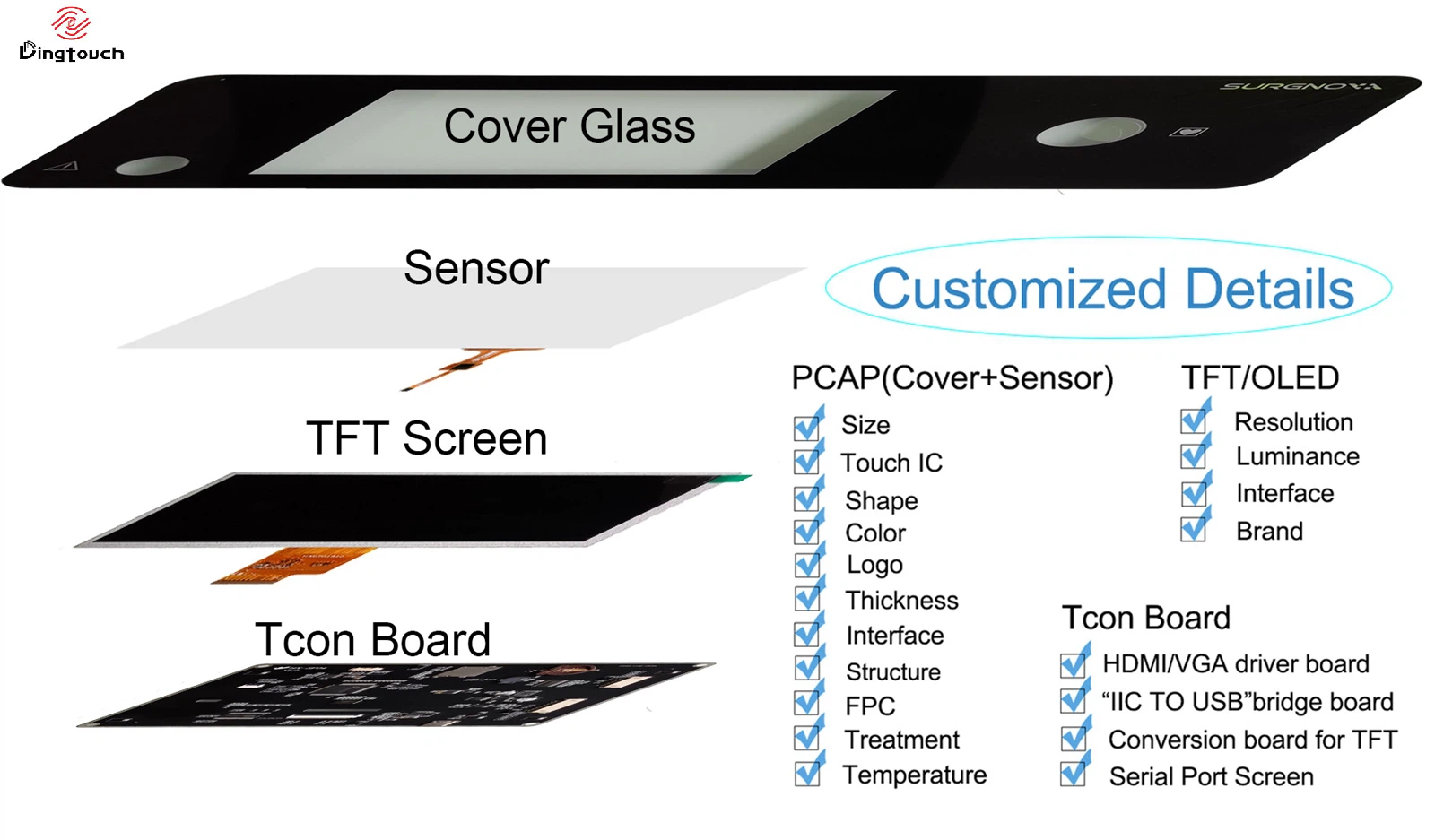
For industrial display projects, selecting the right interface is only one part of building a reliable display solution. The display size, brightness, touch functionality, operating temperature, cover glass, bonding method, and mechanical installation also affect the final design.
DINGTouch provides industrial TFT LCD and capacitive touch display customization for OEM and ODM applications, helping customers evaluate display compatibility and integration requirements.
Depending on the selected panel and controller, project evaluation may cover:
-
Display interfaces: RGB, LVDS, MIPI DSI, eDP, HDMI-based display solutions, and other supported configurations.
-
Touch interfaces: I²C, USB, and other controller-dependent options.
-
Optical bonding: OCA or LOCA full bonding for suitable display assemblies.
-
Cover glass customization: Dimensions, thickness, shape, printing, and selected surface treatments.
-
Industrial performance: Brightness, wide-temperature operation, touch behavior, and environmental requirements.
-
Mechanical integration: FPC routing, connector selection, mounting dimensions, and module structure.
Not every display panel supports every interface or customization option. Availability depends on the panel, controller, host platform, and project requirements.
For a new design, customers should provide the target display size, resolution, processor or development board, preferred interface, brightness requirement, operating temperature, and touch requirements. This information helps the engineering team evaluate a suitable display configuration before hardware development proceeds.
Learn more about DINGTouch at www.szdingtouch.com.
9. Conclusion: Choose the Interface That Fits Your System
RGB, MCU, and TTL parallel are related terms, but they describe different aspects of display integration.
-
RGB / DPI is designed for continuous pixel transmission and is suitable for systems with a compatible display controller.
-
MCU 8080 / 6800 uses command-and-data transactions and is commonly used with controller-based embedded displays.
-
TTL parallel describes an electrical signaling approach often associated with RGB interfaces; it should not automatically be treated as a separate protocol.
The best choice depends on the host processor, display resolution, refresh requirements, memory architecture, available I/O, electrical compatibility, and long-term maintenance needs.
For industrial TFT LCD projects, evaluating these factors early can reduce integration risks, simplify PCB design, and avoid unnecessary redesign.
DINGTouch supports industrial display customization and interface evaluation to help OEM and system integrators identify display solutions that match their application requirements.
Frequently Asked Questions
1. Is TTL RGB the same as an RGB parallel interface?
TTL RGB generally refers to an RGB parallel interface implemented with single-ended digital logic signals. RGB describes the pixel-data and timing architecture, while TTL describes the signaling convention. The exact electrical voltage levels must be confirmed in the module datasheet.
2. What is the difference between an RGB interface and an MCU interface?
RGB continuously transfers pixel data using a pixel clock and video timing signals. An MCU interface transfers commands and pixel data through a bus, often writing data into memory inside the display controller. RGB is common in SoC-driven graphics systems, while MCU interfaces are widely used in microcontroller-based displays.
3. Is a 16-bit RGB interface sufficient for industrial displays?
RGB565 may be sufficient for industrial control panels, status displays, and interfaces dominated by text, icons, and simple graphics. Applications requiring more precise colors, smoother gradients, or detailed images may benefit from RGB666 or RGB888.
4. Can an MCU drive an RGB TFT LCD?
Yes, provided the MCU or an external component supplies the required continuous pixel data and timing signals. Some MCUs include a dedicated LCD or RGB display controller. A general-purpose MCU without suitable hardware may not be able to drive the panel directly at the required resolution and refresh rate.
5. Is an MCU interface always slower than RGB?
No. Performance depends on the bus width, operating frequency, display controller, internal memory, host implementation, and update pattern. RGB is well suited to continuous full-screen refresh, while an MCU interface can be efficient when only small portions of the screen need to change.
6. How do engineers calculate the bandwidth required for an RGB display?
A basic estimate is:
Active pixel data rate = Horizontal resolution × Vertical resolution × Refresh rate × Bits per pixel
For an 800 × 480 display at 60 Hz with 24-bit RGB data, the active-pixel data rate is approximately 553 Mbit/s. The actual pixel clock and interface requirements must also account for blanking intervals and the display's specified timing.
7. Can an RGB display be connected directly to an MCU 8080 interface?
Not normally. RGB and MCU interfaces use different communication architectures. Direct connection requires compatible interface hardware or a suitable bridge/controller, and the software and timing requirements must also be addressed.
8. What information is needed to select a suitable industrial TFT LCD interface?
Engineers should identify the display size, resolution, host processor, supported interfaces, target refresh rate, available I/O, logic voltage, brightness, operating temperature, touch requirements, and mechanical constraints. These details help determine whether RGB, MCU, or a serial interface is the most appropriate option.
9. Does reducing RGB bit depth solve EMI problems?
Not necessarily. Reducing bit depth can reduce the number of data lines and may simplify routing, but EMI also depends on clock frequency, signal edge rates, PCB layout, grounding, cabling, and the complete system design. Signal-integrity and EMC validation remain important.
10. Does DINGTouch support customized industrial touch display interfaces?
DINGTouch provides industrial TFT LCD and touch display customization based on project requirements and component availability. Interface selection, touch-controller compatibility, cover glass, optical bonding, brightness, and operating temperature can be evaluated during project development. Final specifications depend on the selected panel and system architecture.



Ready to Build Your Outdoor Display Solution?
Get in touch with us at sales@szdingtouch.com. Our expert engineers will help you design a cost-effective, tailored solution to meet your project’s exact specifications.
DINGTouch:Committed to continuous innovation and improvement of product quality to meet customers' high requirements and expectations.
DINGTouch is a manufacturer that provides high quality touch screen panels. Focus on the design, manufacturing and sales of touch screen panels, and are committed to providing customized solutions that satisfy customers.
DINGTouch: In the process of customizing touch screen panels, we focus on close cooperation and communication with customers. Understanding customers' needs and providing customized solutions will meet customers' individual needs. The company's products are favored by customers for their high quality and reliability, and provide them with the best touchscreen panel solutions.
DINGTouch:Committed to continuous innovation and improvement of product quality to meet customers' high requirements and expectations.
DINGTouch is a manufacturer that provides high quality touch screen panels. Focus on the design, manufacturing and sales of touch screen panels, and are committed to providing customized solutions that satisfy customers.
DINGTouch: In the process of customizing touch screen panels, we focus on close cooperation and communication with customers. Understanding customers' needs and providing customized solutions will meet customers' individual needs. The company's products are favored by customers for their high quality and reliability, and provide them with the best touchscreen panel solutions.
At DINGTOUCH, we are the world's leading touchscreen manufacturer, helping businesses around the world take advantage of this exciting technology. For more information, please visit the home page now.

DINGTouch is a company specializing in the R&D and production of touch screen technology, headquartered in Shenzhen, China. As a professional touch screen supplier, DINGTouch is committed to providing high-quality, stable and reliable touch screen products to meet the diverse needs of customers. We continue to carry out technological innovation and product optimization to ensure that its touch screen products have good sensitivity, accuracy and durability.
In addition to the products themselves, we also focus on cooperation and communication with customers, and are committed to providing customized solutions and excellent after-sales services. Through continuous efforts to improve product quality and customer satisfaction, we have established a good reputation in the touchscreen industry and won widespread market recognition.
In addition to the products themselves, we also focus on cooperation and communication with customers, and are committed to providing customized solutions and excellent after-sales services. Through continuous efforts to improve product quality and customer satisfaction, we have established a good reputation in the touchscreen industry and won widespread market recognition.
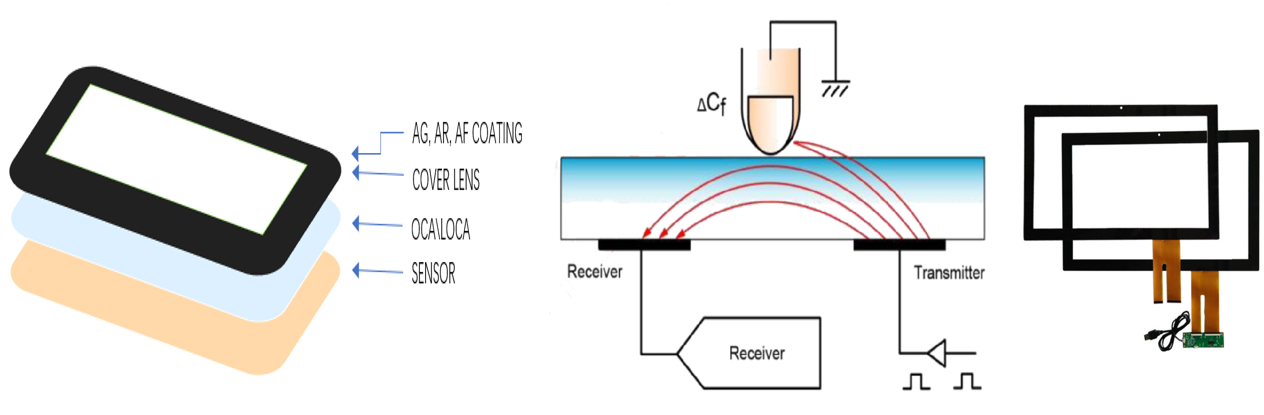
What DINGTOUCH can do:
• PCAP maximum size 65”
• Multi-touch (Touch screen can be customized to your needs.)
• Optical bonding service/air bonding
• LCD interface: HDMI/RGB/MIPI/LVDS/EDP, etc.
• PCAP interface: IIC/USB interface
• CTP can customize the cover glass surface treatment process AG (anti-glare), AR (anti-reflection), AF (anti-fingerprint), waterproof, and glove touch
• Supports 0.55 mm-12 mm coverslip touch.
• Support operating temperature: -40℃-90℃.
CATEGORIES
CONTACT US
Contact: Dingtouch
Phone: +8615815536116
Tel: +8615815536116
Email: sales@szdingtouch.com
Add: Building A, Bailu Plaza, No. 48, Gonghe Industrial Road, Gongle Community, Xixiang Street, Baoan District, Shenzhen,China. 518126
 Dingtouch