News
Industrial Display Controllers Explained: How to Handle HDMI, LVDS, eDP, MIPI and Display Compatibility
 Industrial Display Controllers Explained: How to Handle HDMI, LVDS, eDP, MIPI and Display Compatibility
Why Industrial Display Integration Is More Complex Than Most Engineers Expect
Many engineers assume a display controller is simply an interface converter:
- HDMI to LVDS
- DisplayPort to eDP
- VGA to MIPI
- DVI to LVDS
At first glance, the task appears straightforward.
However, industrial display integration is rarely about connector compatibility alone.
At DINGTouch, we frequently encounter projects where a replacement LCD panel has:
- The same screen size
- The same resolution
- The same interface type
Yet the display still fails to operate correctly.
Common symptoms include:
- Black screen
- Image flickering
- Shifted display area
- Random signal loss
- Touch function failure
- EMC compliance issues
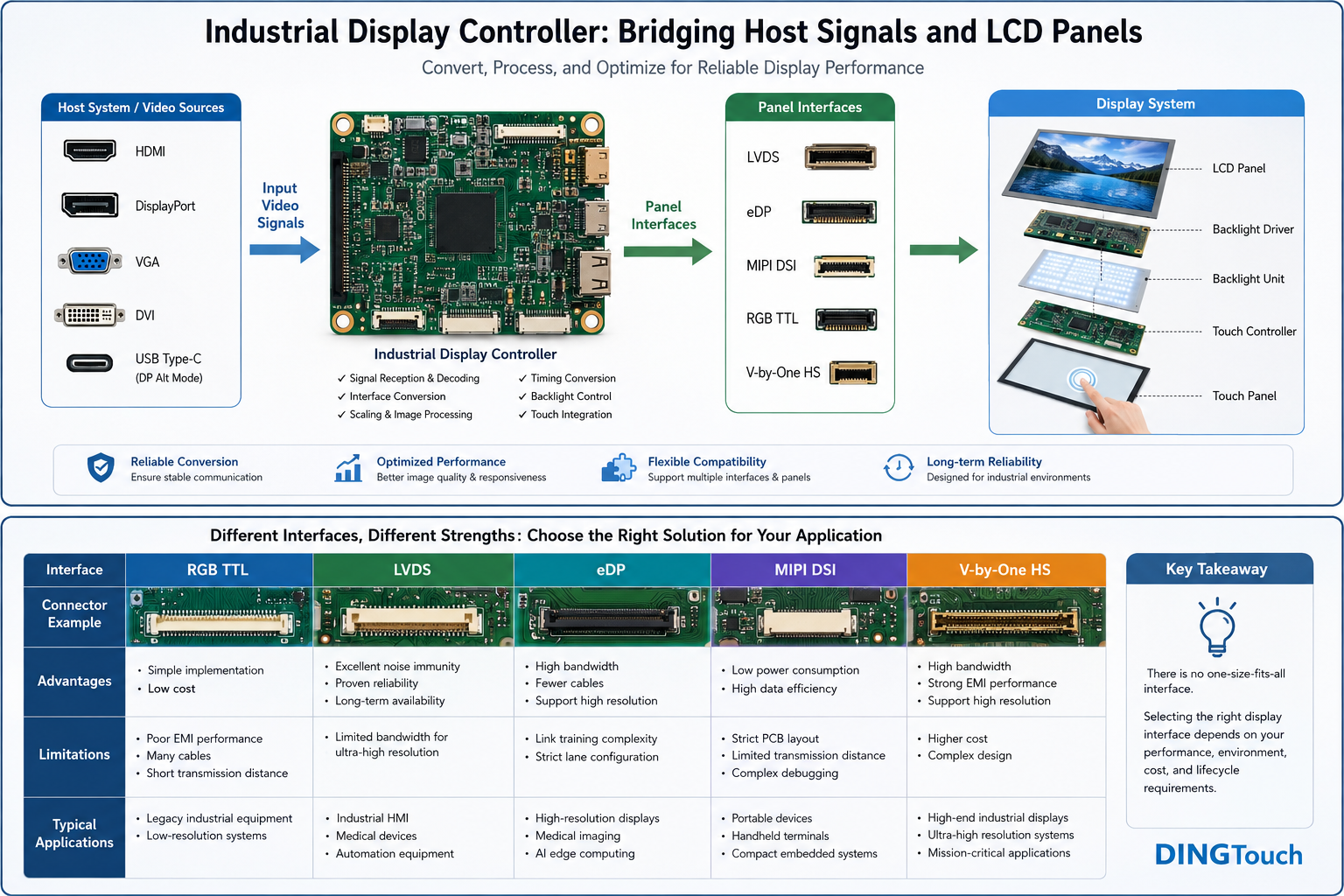
The reality is that industrial display controllers are responsible for much more than signal conversion. They bridge compatibility gaps between the host system and the display module while ensuring long-term reliability throughout the product lifecycle.
 What Does an Industrial Display Controller Actually Do?
Industrial display controllers are often referred to as:
- LCD Controller Boards
- Driver Boards
- Scaler Boards
- Display Interface Converters
Their primary function is to manage communication between the host system and the LCD panel.
A typical industrial display architecture looks like this:
Host CPU / GPU
↓
Display Controller
↓
LCD Panel
↓
Backlight Driver
↓
Touch Controller
The controller acts as the central coordinator that ensures all components operate together correctly.
1. Signal Reception and Interface Conversion
Industrial systems may output video through:
- HDMI
- DisplayPort (DP)
- VGA
- DVI
- USB Type-C with DP Alt Mode
However, LCD panels usually require panel-specific interfaces such as:
- LVDS
- eDP
- MIPI DSI
- RGB TTL
- V-by-One HS
Without a display controller, direct communication between the host system and the panel is often impossible.
The controller receives incoming video data, decodes it, and converts it into the format required by the target display panel.
Why Resolution Scaling Is Not a Universal Solution
A common misconception is that a scaler automatically solves any resolution mismatch.
For example:
Input Signal:
1280 × 720
Panel Resolution:
1920 × 1080
A display controller can perform:
- Upscaling
- Cropping
- Aspect Ratio Preservation
- 1:1 Pixel Mapping
However, every scaling method introduces trade-offs.
Basic Scaling Algorithms
Advantages:
- Lower cost
- Minimal processing overhead
Limitations:
- Reduced text clarity
- Softer user interface graphics
Advanced Scaling Engines
Advantages:
- Better image quality
- Improved edge preservation
Limitations:
- Higher controller cost
- Additional processing latency
For industrial HMIs, machine control systems, and medical equipment, readability and responsiveness are often more important than consumer-grade image enhancement.
For this reason, DINGTouch typically recommends matching the system output resolution directly to the panel's native resolution whenever possible.
2. Timing Conversion: The Hidden Challenge
Display compatibility is determined by much more than resolution.
Every LCD panel requires specific timing parameters, including:
- Pixel Clock
- Horizontal Sync (HSync)
- Vertical Sync (VSync)
- Front Porch
- Back Porch
- Sync Width
- Data Enable (DE)
Consider two LCD panels that share the same resolution:
| Parameter | Panel A | Panel B |
|---|---|---|
| Resolution | 1920×1080 | 1920×1080 |
| Pixel Clock | 148.5 MHz | 138.5 MHz |
| Refresh Rate | 60 Hz | 50 Hz |
| Color Depth | 8-bit | 6-bit |
| LVDS Configuration | Dual Channel | Single Channel |
Although both panels are Full HD, incorrect timing configuration may result in:
- Black screens
- Flickering
- Partial image display
- Signal instability
- Image shifting
In many industrial projects, what appears to be a defective display is actually a timing mismatch issue.
3. Understanding Industrial Display Interfaces
RGB TTL
Advantages:
- Simple implementation
- Low cost
Limitations:
- Poor EMI performance
- Large cable count
- Limited transmission distance
Typical Applications:
- Legacy industrial equipment
- Low-resolution systems
LVDS
LVDS remains one of the most widely used industrial display interfaces.
Advantages:
- Excellent noise immunity
- Proven reliability
- Long-term availability
Applications:
- Industrial HMI systems
- Medical devices
- Factory automation equipment
Although newer technologies continue to emerge, LVDS remains highly relevant for long-life industrial products.
eDP
Embedded DisplayPort (eDP) is becoming increasingly popular in modern industrial platforms.
Advantages:
- Higher bandwidth
- Reduced cable complexity
- Support for higher resolutions
Challenges:
- Link training requirements
- More complex lane configurations
Applications:
- High-resolution industrial displays
- Medical imaging systems
- AI edge computing terminals
MIPI DSI
MIPI DSI is commonly used in:
- Portable devices
- Embedded handheld terminals
- Compact industrial systems
Advantages:
- Low power consumption
- High bandwidth efficiency
Limitations:
- Strict PCB layout requirements
- Limited transmission distance
- More complex debugging
MIPI is highly effective in compact devices but may not be the ideal choice for every industrial environment.
Why Industrial Display Adaptation Is More Difficult Than Consumer Displays
Consumer displays usually follow a simple architecture:
Host → HDMI → Monitor
Industrial display systems often include:
Host CPU/GPU
↓
Operating System
↓
Display Controller
↓
Firmware Configuration
↓
LCD Panel
↓
Backlight Driver
↓
Touch Controller
Each component introduces variables that affect overall system stability.
Industrial projects must consider:
- EMI resistance
- Wide temperature operation
- Long-term supply continuity
- Regulatory compliance
- Future panel replacement strategies
A display that works today must continue working reliably for years.
Why Panels with the Same Resolution Are Not Always Interchangeable
This is one of the most common misconceptions in industrial display projects.
Two 10.1-inch 1280×800 LVDS panels may differ in:
- Pin assignments
- Power sequencing requirements
- Backlight control methods
- Timing specifications
- EDID settings
- Firmware dependencies
Therefore:
Same Size ≠ Same Resolution ≠ Full Compatibility
Before recommending replacement panels, DINGTouch engineers always review the original panel datasheet to identify potential compatibility risks.
Display Compatibility Does Not Guarantee Touch Compatibility
Industrial touch displays contain two independent subsystems:
Display Path
Responsible for image generation and presentation.
Touch Path
Responsible for user interaction.
Even if a replacement LCD functions correctly, touch-related issues may still occur:
- Coordinate mapping errors
- Missing operating system drivers
- Touch controller incompatibility
- Reduced glove-touch performance
- EMC-related false triggering
For integrated touch display projects, both display and touch systems should always be validated together.
When Should You Avoid Using a Scaling Controller?
Real-Time Applications
Examples:
- Machine vision systems
- Remote operation equipment
- High-speed industrial control systems
Additional image processing latency may negatively impact performance.
High-Reliability Systems
Examples:
- Medical devices
- Defense equipment
- Safety-critical control systems
Additional controller boards introduce:
- More heat generation
- Increased EMI exposure
- Additional points of failure
Native panel interfaces often provide a more robust long-term solution.
Extreme Environmental Conditions
Examples:
- Outdoor equipment
- Wide-temperature systems (-30°C to +85°C)
The controller itself must meet the same environmental requirements as the display module.
Otherwise, the controller becomes the weakest link in the system.
Best Practices for Successful Industrial Display Integration
Before selecting a controller solution, engineers should verify:
Display Parameters
✓ Panel model
✓ Resolution
✓ Interface type
✓ Pixel clock
✓ Timing specifications
✓ Backlight driver requirements
Touch Parameters
✓ Touch controller IC
✓ USB or I²C communication
✓ Driver compatibility
✓ Glove-touch requirements
Environmental Requirements
✓ EMI/EMC standards
✓ Operating temperature range
✓ IP protection rating
✓ Product lifecycle expectations
Early verification can prevent most integration issues before production begins.
How DINGTouch Supports Industrial Display Integration
At DINGTouch, we provide more than custom touch screens and TFT LCD display modules.
Our engineering team assists customers with:
- LCD panel selection
- Display controller evaluation
- Interface conversion analysis
- Touch controller integration
- Optical bonding solutions
- EMI optimization
- Long-term supply planning
Whether your project involves industrial automation, medical equipment, transportation systems, outdoor kiosks, or intelligent HMI platforms, our goal is to ensure stable display performance throughout the entire product lifecycle.
Conclusion
An industrial display controller is far more than an HDMI-to-LVDS converter.
Successful industrial display integration requires careful consideration of:
- Interface conversion
- Timing compatibility
- Resolution optimization
- Backlight management
- Touch integration
- EMI performance
- Long-term lifecycle planning
In industrial applications, long-term compatibility is often far more important than interface specifications alone.
Choosing the right controller strategy at the beginning of a project can save significant development time, reduce field failures, and improve product reliability for years to come.
CATEGORIES
CONTACT US
Contact: Dingtouch
Phone: +8615815536116
Tel: +8615815536116
Email: sales@szdingtouch.com
Add: Building A, Bailu Plaza, No. 48, Gonghe Industrial Road, Gongle Community, Xixiang Street, Baoan District, Shenzhen,China. 518126
 Dingtouch